
This chapter covers how to store the PortalCam, safety and precautions, and the device specifications.
Storage
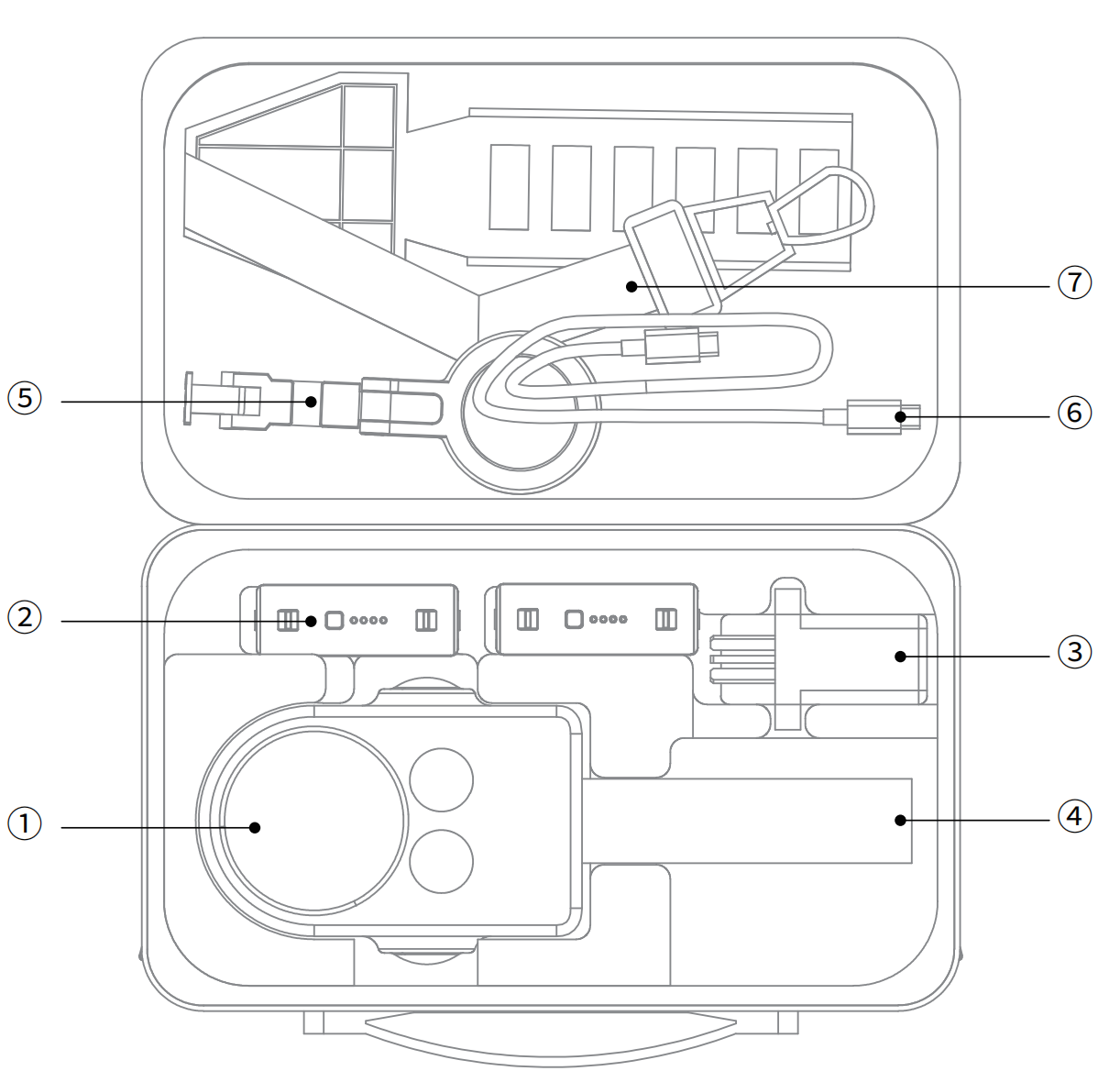
The supplied carrying case contains:
➀ Main device and protective cover ➁ Battery ➂ Charging head ➃ Tripod ➄ Phone mount ➅ Cable ➆ Shoulder strap
Safety and Care Instructions
- Prevent drops and impacts: the PortalCam is a precision device. Drops or external impacts may cause damage, leading to malfunction or accuracy deviation.
- Operating environment and cleaning: do not use the device in dusty environments or in the rain. When cleaning, use a soft dry cloth or the supplied cleaning cloth to keep the LiDAR window and lens surfaces clean. Do not touch the lens directly with your hands.
- Initialization: use the tripod to support the device and keep it still on a flat area to complete initialization. Avoid initializing on uneven ground, which may cause initialization to fail or increase the mapping thickness.
- Temperature safety: the device generates heat while operating. Avoid direct contact with the body to prevent burns.
- Heat dissipation protection: do not cover or block the heat dissipation area during use. If heat dissipation is obstructed, the device's cooling efficiency drops, and in severe cases the device may stop working automatically.
Appendix:
| Category | Parameter | PortalCam |
|---|---|---|
| System parameters | Power | <19W |
| Weight | 870 g (without tripod) | |
| Dimensions | 130 mm × 90 mm × 77 mm | |
| Data interface | USB 3.0 | |
| Internal storage | 512 G | |
| Wi-Fi | a/b/g/n/ac/ax; 2.4G Wi-Fi 2412–2472 MHz; 5G2 Wi-Fi 5180–5240 MHz; 5G8 Wi-Fi 5745–5825 MHz | |
| Bluetooth | BT5.2 802.11a/b/g/n/ac | |
| Operating temperature | -20°C to 45°C (without solar radiation) | |
| Product casing | Aviation aluminum | |
| Power supply | Removable battery | |
| Scanning operating time | 60 minutes | |
| Battery capacity | 23.04 Wh | |
| Charging time (room temp 25°C) | 0%–90% @ 70 min; 0%–100% @ 90 min | |
| Recommended charging temperature | 5–30°C | |
| Number of cameras | 4 (fisheye ×2, front ×2) | |
| App Wi-Fi range | 20 m | |
| LiDAR module | Laser class | Class 1 / 940 nm |
| Scanning range | 0.1 m–30 m @ 10%, 60 m @ 90% | |
| Field of view | Azimuth 180° × Elevation 180° | |
| Point cloud rate | 856,000 points/s | |
| Vision module | Fisheye camera FOV | 200° × 200° |
| Front camera FOV | 100° × 85° | |
| Resolution of all cameras | 4000 × 3000 | |
| CMOS size | 1/2'' | |
| Camera shutter | Rolling shutter | |
| Charger | Input | 100V–240V, 50–60Hz, 1.5A 80VA |
| Output | 20V 2.0A | |
| Rated power | PD protocol >25W; the supplied charging head is a TYPE-C single-port 45W, or 25W+20W when both ports are used together | |
| Accessories | Backpack + insert | Standard |
| 2m extension pole | Optional | |
| 512G/1TB SSD | Optional |
