
LCC Scene Editor provides three navigation modes: First-Person, Pivot, and Avatar. Click the View Mode button to switch between them.
- In Edit Mode, you can switch between First-Person and Pivot modes
- In Preview Mode, you can switch between First-Person, Pivot, and Avatar modes
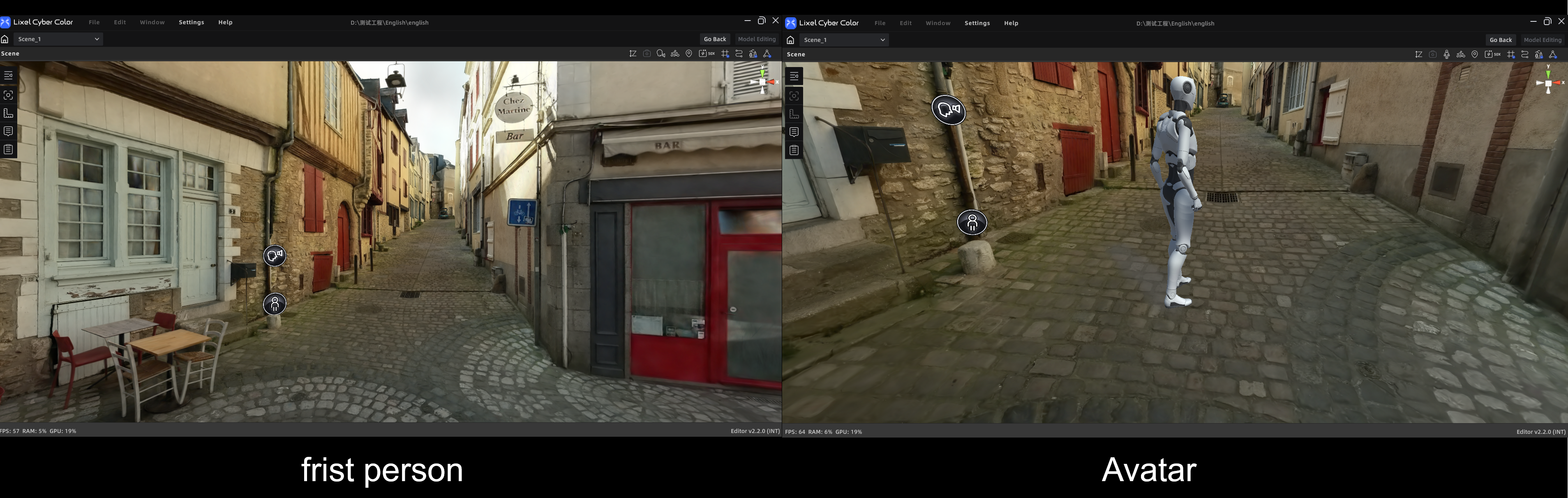
First-Person Mode (left) and Avatar Mode (right)
First-Person Mode
Navigate the space from a first-person perspective, simulating an "eyes-on" experience. Ideal for immersive browsing of indoor spaces or detailed areas.
| Input | Action |
|---|---|
| W / A / S / D / Q / E | Move Forward / Left / Backward / Right / Down / Up |
| Shift | Speed boost |
| Mouse wheel | Adjust movement speed |
| Left mouse drag | Rotate camera |
| Right mouse drag | Pan camera |
Pivot Mode
In Pivot Mode, the camera orbits around a fixed "pivot point" in the scene. Best for viewing the model from a global perspective.
Because panning the camera also shifts the pivot point, switching suddenly from First-Person to Pivot Mode can cause the center to drift and rotation to appear erratic. The Spawn Point function serves as a "Reset Center" — click it to instantly recalibrate the camera position and restore the model center.
| Input | Action |
|---|---|
| Mouse wheel | Zoom |
| Left mouse drag | Orbit around the pivot point |
| Right mouse drag | Pan camera |
| Double-click a point | Quickly set a new pivot center |
Avatar Mode (Preview Mode only)
Avatar Mode lets a virtual character walk through the scene. Only immersive navigation is supported — measurement and annotation features are not available in this mode.
| Input | Action |
|---|---|
| W / A / S / D | Move Forward / Left / Backward / Right |
| Space | Jump |
| Shift | Speed boost |
| Left mouse click on target | Click-to-navigate (auto-walk) |
| Left mouse drag | Rotate camera |
